AGC - Parent Guide to Online IBDP Mock Exams
Welcome to Mock Exam Week! As our Online IB Diploma Programme students approach their final examinations, "Mock Week" serves as a critical dress rehearsal. Because these exams are being held remotely, your support in creating a professional "exam hall" environment at home is essential.
This guide covers what mock exams are, how the remote proctoring technology works, and how you can support your child’s success and well-being.
1. What are Mock Exams?
Mock exams are full-length practice examinations that simulate the conditions, timing, and difficulty of the final IBDP exams. Unlike regular class tests, these cover the entire syllabus taught so far.
Why are they important?
Diagnostic Tool: They show us exactly what a student knows versus what they think they know. This highlights gaps in knowledge while there is still time to fix them.
Building "Exam Fitness": Writing by hand for 2–3 hours requires physical and mental endurance. Mocks train students to manage their energy and focus over long periods.
Stress Inoculation: By experiencing the pressure of the clock and exam conditions now, students feel less anxiety during the real exams later.
Predicted Grades: Results often help inform the predicted grades submitted to universities, making them a high-stakes event for university applications.
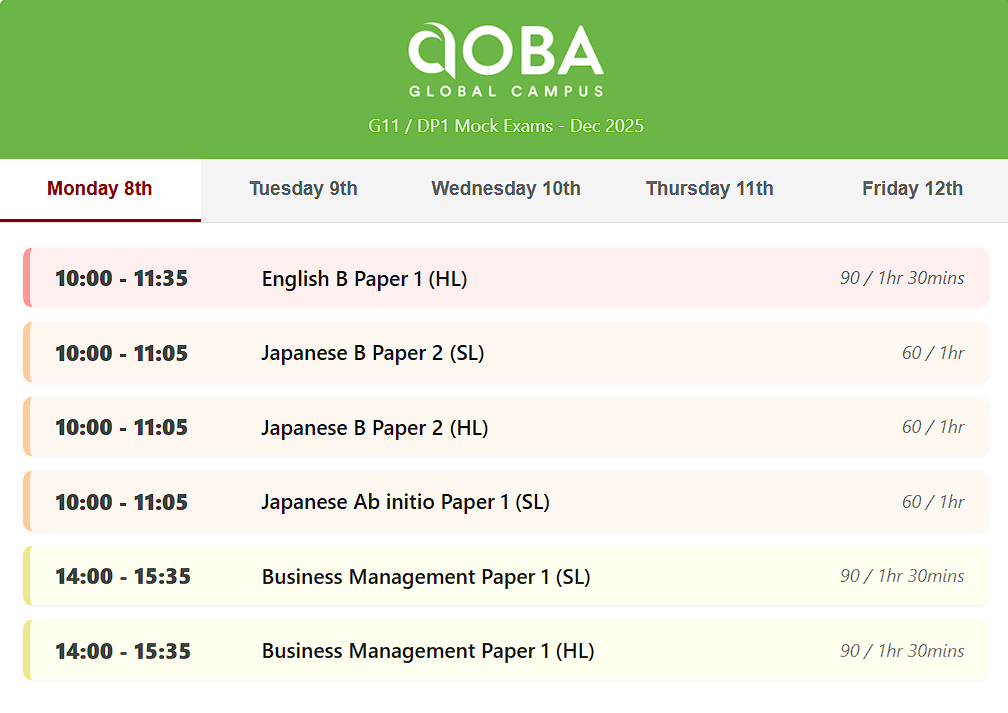
Example Schedule:

Further Reading:
https://www.ibo.org/programmes/diploma-programme/assessment-and-exams/sample-exam-papers/
https://www.ibo.org/programmes/diploma-programme/assessment-and-exams/understanding-ib-assessment/
https://www.ibo.org/programmes/diploma-programme/assessment-and-exams/exam-schedule/
https://www.ibo.org/programmes/diploma-programme/assessment-and-exams/exam-calculator-policy/
https://www.ibo.org/news/news-about-the-ib/ib-updates-assessment-procedures-for-may-2025-exams/
2. How Remote Proctoring Works (AutoProctor)
To maintain the integrity of the exams, we are using AutoProctor, an automated proctoring software. We understand privacy is a concern for parents, so here is exactly how it functions:
The "Smoke Detector" Analogy
Think of AutoProctor like a smoke detector. It is "monitoring" the environment but only "beeps" (flags an incident) when it detects something specific. It does not have a human watching your child live every second, but it records evidence if rules are broken.
What does it monitor?
Visuals: It uses the webcam to detect if the student looks away from the screen frequently, if another person enters the room, or if the student leaves the frame.
Audio: It detects voices or significant background noise.
Browser Activity: It tracks if the student switches tabs (e.g., to Google an answer) or attempts to copy-paste.
Privacy & Data
Recording: The system records video/audio snippets only when a potential violation is detected.
Data Security: Data is encrypted and used solely for verifying exam integrity. It is not sold or used for marketing. It is kept stored in AutoProctor’s encrypted severs and not downloaded, shared, or made available to 3rd parties.
The "False Flag" Fear: Students and families may worry "What if my dog barks?" or “What if the doorbell rings?”. AutoProctor will flag this as "noise," but a human teacher reviews the flags. We can easily see it was just a dog or a package delivery and ignore it. Your child should not panic if minor household noises occur; they should just keep working.
3. The "Home Exam Hall": Requirements
For this week, your child’s bedroom or study space effectively becomes a campus exam hall. We need your help to ensure it meets these standards:
The Physical Setup
Private & Quiet: The student must be alone. Please ensure siblings, friends, relatives, (and pets!) know not to enter.
Clear Desk: The desk should be completely clear of books, notes, and extra papers. Only the exam paper, pens, and authorized equipment (calculator etc.) are allowed.
Lighting: The room must be well-lit so the webcam can see the student clearly. Avoid having a bright window directly behind the student (backlighting), which makes their face dark.
Camera Angle: The primary webcam should capture the student’s face and the upper part of their torso. The secondary camera (smartphone, tablet etc.) should be angled to show their keyboard, mouse, hands, and desk space.
The Technological Setup
Stable Internet: Limit heavy bandwidth usage (e.g., streaming 4K movies, gaming) by other family members during exam blocks.
Power: Ensure computers, laptops are fully charged or, more ideally, plugged in for the duration.
Devices: Aside from the device used as the “secondary camera”, all other devices such as smartphones, ereaders, smart watches, tablets and others must be out of reach during the exam. A secondary device is allowed only at the very end for scanning (see below). We recommend removing all devices from the room entirely to avoid suspicion.
The Scanning Process
Most exams will be handwritten.
During the Exam: Students write answers on paper.
Submission: When the time is up, students will be instructed to use Adobe Scan on their phones to scan and submit their work. This provides the school a verified timestamp of when the work was scanned and submitted.
Integrity Check: This is the only time a phone should be visible on camera. Students have practiced this, but please remind them to ensure their scans are legible before submitting.
4. How Parents Can Support (The "Off-Class" Week)
Students do not attend regular classes this week. This freedom can be daunting. Here is how you can help structure their time:
🥗 Diet & Sleep
Fuel the Brain: Avoid heavy, carb-loaded lunches that cause "brain fog" in the afternoon. Opt for proteins, vegetables, and complex carbs. Ensure they drink water before the exam, not just during.
Protect Sleep: Late-night cramming yields diminishing returns. Verify that devices are off at a reasonable hour. A tired brain makes silly mistakes.
🏠 Environment & Atmosphere
Be the Gatekeeper: Protect them from household chores or social obligations during exam hours.
"Emotion-First" Support: If your child comes out of an exam upset, avoid asking "What grade do you think you got?" immediately. Students may struggle or encounter unexpected gaps in their knowledge or exam taking abilities - this is normal and is why we administer mock exams as early as the first semester of Year 1 of the Online IBDP. This is an opportunity for students to learn about their own learning, and for us to support them.
The Post-Exam Reset: After an exam, encourage them to leave the "exam room." A change of scenery, a walk outside, or 20 minutes of non-screen time helps reset the brain for the next study block.
📅 Managing "Free" Time
Study vs. Rest: With no classes, students may feel guilty if they aren't studying 24/7. This is unsustainable. Encourage them to block out "Study," "Exam," and "Rest" chunks in a calendar.
Don't Over-Proctor: You ensure the environment is quiet, but you don't need to stand guard. Trust the software and trust your child. Your role is cheerleader, not policeman.
🚀 Next Steps for Parents
Check the Schedule: Ask your child to share their exam timetable with you so you can put the "Quiet Hours" on the family calendar.
Test the Tech: Have your child run a quick webcam/mic check in their room now, rather than 10 minutes before the first exam.
We appreciate your partnership in ensuring a fair, focused, and successful Mock Exam week for all our students!