.png)
-
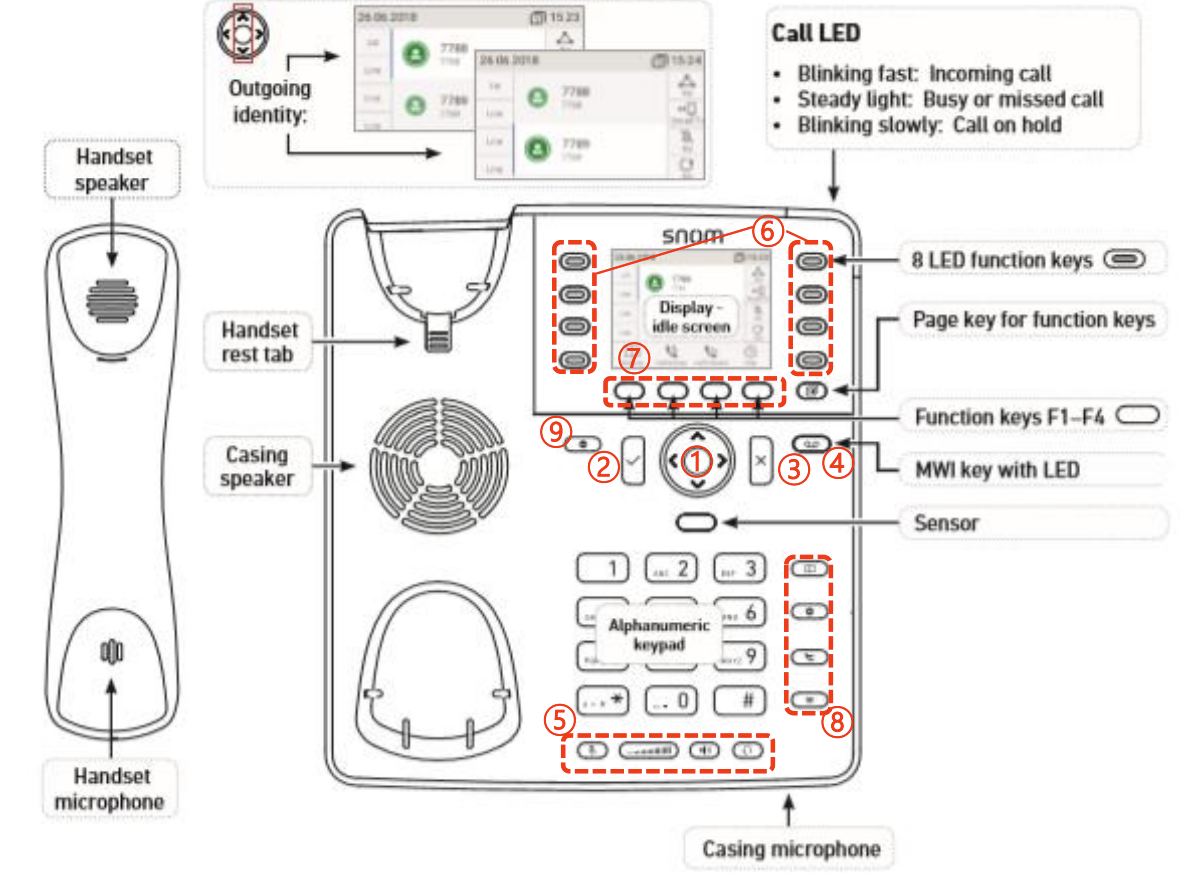
Navigation key - for navigation within the display menu and the phone book.
-
Enter key - to confirm actions, selections and inputs.
*Always press the “ENTER Key” after inputting the numbers dialed
-
Cancel Key - to cancel actions or inputs.
-
LED for MWI - (Message Waiting Indicator)
-
Mute Key - Mute/unmute microphone

Volume Key - key to adjust the volume to (lower/higher) 
Speaker - turns the speaker on/off 
Headset Key - Headset mode on/off 
-
Freely programmable function keys - The 8 keys around the display with LEDs are the programmable function keys
onto which different functionalities can be mapped.
-
Function keys F1–F4 - Standard functions available on idle screen.
-
Directory Key - Internal phone directory

Setting Key - Setting menu 
Transfer Key - Transfer call 
Hold Key - Key to Put call on hold/resume call 
-
DND Key - Turn "do not disturb" (DND) mode on and off for all identities registered on the phone.