.png)
If you are experiencing problems when using the BenQ InstaShare application, sometimes the version is out of date or a fix has been implemented in a newer version and an update is recommended.
As the lease with certain models comes to a close, it will become necessary to have InstaShare version 1 & 2, both, installed on your computer. Certain BenQs will no longer support older versions of InstaShare.
📘 Instructions
-
If you are experiencing issues with the InstaShare App please note the app version number.
-
When the InstaShare App is open click the Application Name in the top left corner that says “InstaShare”.
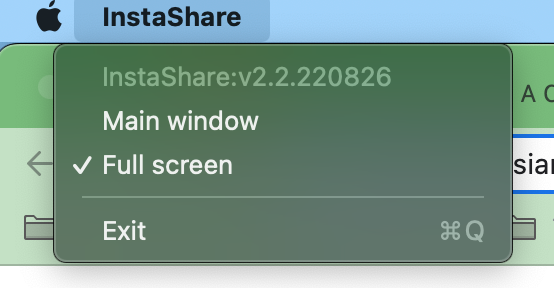
The App version number in this picture is InstaShare:v2.2.220826 -
Contact the ICT Team by either emailing helpdesk@aobajapan.jp or submitting a ticket at this webpage. Please include the app version number and a brief description of the issue you are having such as “Screen is pixelated when using the BenQ InstaShare App”.
-
The ICT Team will get back to you as soon as possible and try to resolve your issues.