.png)
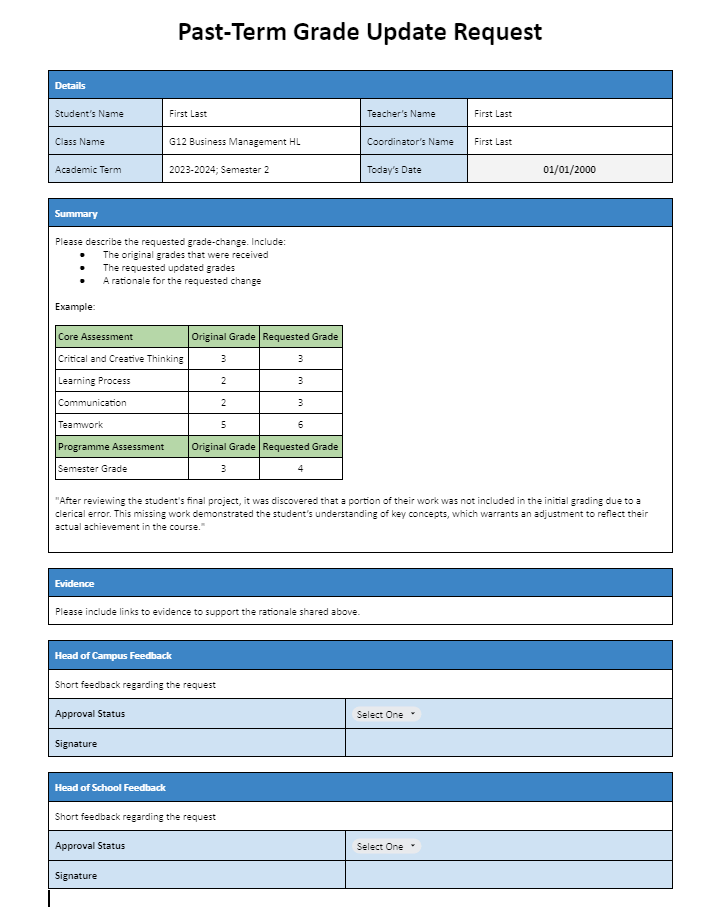
To request a past-term grade update, coordinators must submit a request to their Head of Campus, who will review it and, if approved, forward it to the Head of School for final approval.
Past-term grade updates are exceptional requests requiring evidence to justify changes to a concluded term's record with published reports.
📘 Procedure Overview
-
Coordinators Submit a Grade Update Request Submission:
-
Make of copy of the Past-Term Grade Update Request form.
-
Complete the Details, Summary, and Evidence sections
-
Share the document (Editing Rights) with the Head of Campus
-
-
Head of Campus Reviews and Provides Feedback
-
Complete the “Head of Campus Feedback” section
-
Select an Approval Status (Approved / Rejected)
-
Insert their signature
-
If approved, share the document (Editing Rights) with the Head of School
-
-
Head of School Reviews and Provides Feedback
-
Complete the “Head of School Feedback” section
-
Select an Approval Status (Approved / Rejected)
-
Insert their signature
-
If approved, share the document (Viewing Rights) with the Registrar
-
-
If approved, the Registrar:
-
Downloads the approved request form as PDF and uploads it to the student’s record as an unpublished document
-
Makes the changes in the School Information System (Veracross)
-
Communicates to all involved parties that the requested change has been made
-